

Necə VirtualBox 256MB video yaddaş artırmaq üçün?
The maximum amount of video memory that can be allocated from the VirtualBox GUI is 128mb.

video yaddaş command line isteminden 256MB daha artırıla bilər.
Skript istemi açın və VirtualBox quraşdırılması yeri gedin. Usually the default installation location is C:\Program Files\Oracle\VirtualBox
Sonra öz VM adı ilə aşağıdakı funksiyanı yazın:
VBoxManage modifyvm "Virtual machine name" --vram 256
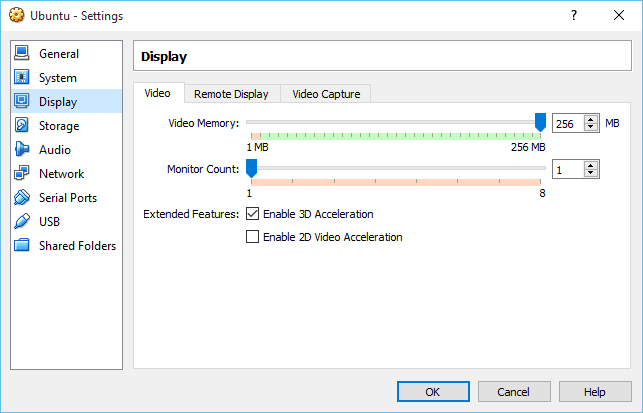
Komanda uğurla daxil sonra siz VM GUI aşağıdakı görmək lazımdır.

Merci mille fois c’est exactement ce que je cherchais. Y a t’il moyen d’en dédier encore mieux?
Rebonjour
Mince ça a pas marché pour moi. J’obtiens dans cmd VboxManage.exe error: coule not fond a registrated machine named ‘Mac’
VBoxManage.exe error: Détails: code VBOX_E_OBJECT_NOT_FOUND (0x80bb000)…
Une solution svp?