

Necə daimi Windows Synaptics touch pad ayarları pinch və zoom xüsusiyyəti söndürmək üçün 8 / 8.1 / 10
Mən HP həsəd laptop istifadə və web bütün vaxt, zaman göz edirəm. The problem is that the web page keeps zooming whilst I am moving the mouse pointer with the touchpad.
Mən xüsusiyyət Mən nəzarət panel getmək və siçan və touch-pad ayarları getmək lazımdır ki, Synaptics proqram hissəsidir və aşkar. There I click on additional mouse options and select the ClickPad settings tab. Here there is a check-box on Pinch and Zoom which I unchecked.
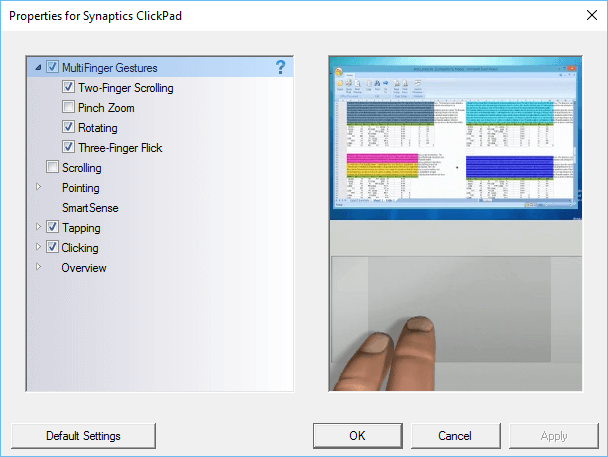
Nəhayət mənim web page problem təsadüfən yakınlaştırma keçmişdir, Mən kompüterinizi yenidən başladın qədər. The zooming problem still happens on web pages. I check the settings in the control panel and find that the Pinch and Zoom check-box is again checked. This happens all the time, Mən qutusu nəfslərinin, maşın yenidən başladın və problem hələ.
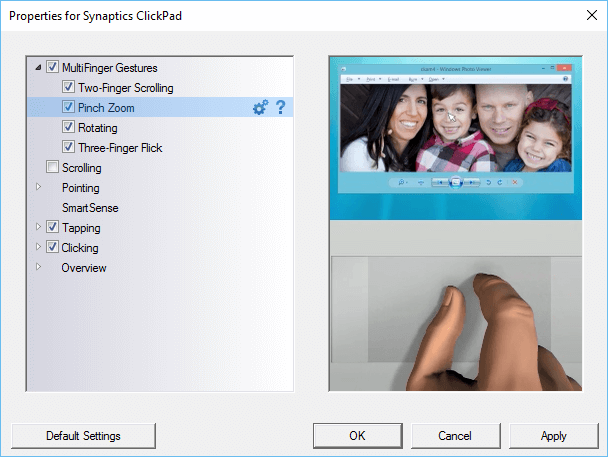
The only way to make sure that the pinch and zoom is permanently turned off is to make a change to the Windows registry.
Aşağıdakı əsas Windows regedit yazın və naviqasiya axtarış qutusuna:
- HKEY_LOCAL_MACHINE
- Proqram
- Synaptics
- SynTp
- Install
- SynTp
- Synaptics
- Proqram
Find the key DeleteUserSettingsOnUpgrade. Right click on it and choose modify. Change the value of this key to 0. Click OK and close the Windows register.
Windows yenidən zaman indi pinch və zoom qəbulu hətta nəfslərinin olunacaq.
