

How to configure a static IP address in CentOS
The following steps will configure CentOS with a static IP address.
- Check the network interface that you would like to set the static IP address on.
ip addr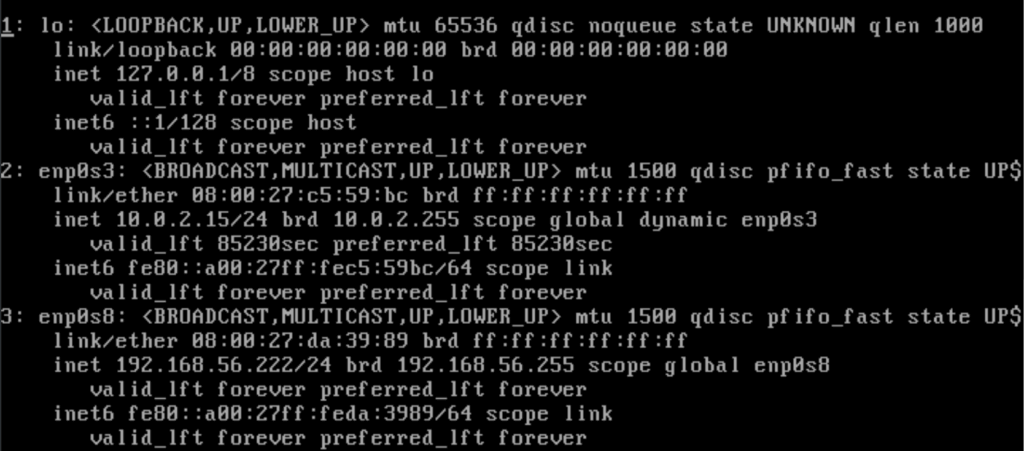
- Here we are setting network interface enp0s8 to be static. We need to edit the corresponding file in the path /etc/sysconfig/network-scripts . The file for interface enp0s8 is ifcfg-enp0s8 .
sudo nano ifcfg-enp0s8 - The file needs to be changed from the following
NAME="enp0s8"
DEVICE="enp0s8"
ONBOOT=yes
NETBOOT=yes
UUID="9ca41371-ee2d-4061-ab44-30bc06df3076"
IPV6INIT=yes
BOOTPROTO=dhcp
TYPE=Ethernet
Change the above to the following to make the interface use a static IP address. Additions are in green and amendments are in amber.
IPADDR=192.168.56.222
נעטמאַסק = 255.255.255.0
GATEWAY = 192.168.56.1
NAME="enp0s8"
DEVICE="enp0s8"
ONBOOT=yes
NETBOOT=yes
UUID="9ca41371-ee2d-4061-ab44-30bc06df3076"
IPV6INIT = יאָ
באָאָטפּראָטאָ = סטאַטיק
TYPE = עטהערנעט
דרוק קטרל + רענטגענ צו ראַטעווען די טעקע
- ריסטאַרט די נעץ דינסט
סערוויס נעץ ריסטאַרט
- באַשטעטיקן די יפּ אַדרעס
ip addr
