
Birta Android smartphone tilkynningar um Windows 7/8.1 skrifborð / laptop / tafla PCs
Tengist Android smartphone til þinn Gluggakista skrifborð eða fartölvu, gefur marga kosti eins og að vera fær um að hlaða símann þinn eða hunsa tilkynningum sem eru ekki mikilvæg þegar þú notar þinn Gluggakista skrifborð eða fartölvu.
Það eru 2 Helstu Android Apps sem eru auðveldlega besta á að leyfa þér að gera þetta. They are:
- Pushbullet
- AirDroid
Bæði forrit þurfa að sækja Windows hugbúnaður, sem apps þá nota til að senda tilkynninguna á fartölvu / skrifborð.
Skulum hafa loka líta á bæði apps hlið við hlið.
The Android App Tengi
AirDroid

Pushbullet

Features
AirDroid
File Transfer
Flytja skrár úr símanum á skjáborðið. Skrá getur verið Text, Myndir, Myndavél, Tónlist eða myndbönd. Airdroid allows to transfer multiple files at any one time.
File Manager
Airdroid hefur einfalda skráastjóri.
Hotspot
Deila farsíma tengingu
Tethering
Virkja USB tethering
Booster
Booster frees RAM by closing apps.
Apps
This is an app manager that allows to uninstall apps
Find phone
Visit a web browser and enter the airdroid url to find your phone.
Hotspot
Share your mobile data connection with other devices.
Tethering
Virkja USB tethering
Pushbullet
File Transfer
Flytja skrár úr símanum á skjáborðið. Skrá getur verið Note, Link, Photo og File. Files can only be transferred one at a time.
Rásir
Pushbullet allows following channel feeds, which allows to receive latest news from followed channels.
Dæmi um það að fylgja eru TopGear, Android og fleira…
Add Friends
If you know anybody registered with pushbullet then you will be able to add them as a friend. Adding friends enables you to push files, photos, notes and links to your friends.
Windows Laptop / Desktop Interface
AirDroid


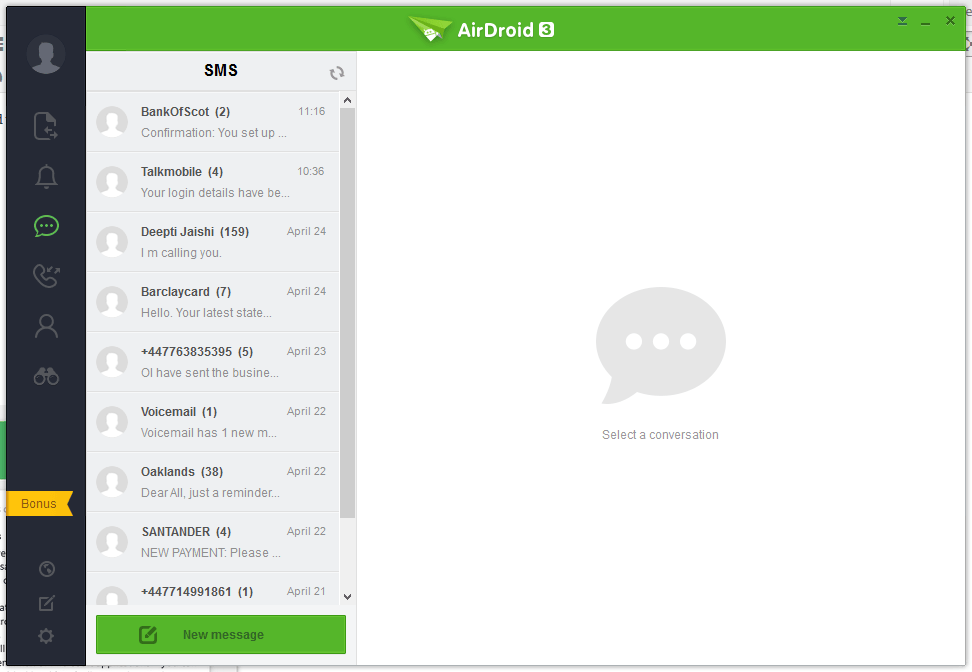


Pushbullet
The following are the screenshots for pushbullet on Windows Desktop.


Memory
Windows
Airdroid used about 160MB memory whilst running in the background, whereas Pushbullet uses 28.7MB.
Android Phone
Airdroid on an android phone uses 9.9MB memory, whereas Pushbullet uses 7MB.
Conclusion
Both apps for sending notifications to a Windows desktop / laptop are very good. If the extra features of Airdroid are relevant to you, then this would be best. If you want to conserve memory and some of the extra features in Airdroid is not required, then Pushbullet is best.
