
Ipakita ang android smartphone notification sa Windows 7/8.1 desktop / kandungan / tablet PC
Pagkonekta ng iyong android smartphone sa iyong desktop o laptop na PC sa Windows, ay nagbibigay ng maraming kalamangan tulad ng pagiging magagawang upang singilin ang iyong telepono o huwag pansinin na hindi mahalaga habang iyo ng mga notification ay gumagamit ng iyong desktop o laptop PC sa Windows.
Marami 2 pangunahing android apps na madali ang pinakamahusay sa pagbibigay-daan sa iyo upang gawin ito. They are:
- Pushbullet
- AirDroid
Parehong apps humihiling sa iyo na i-download sa Windows software, kung saan ang mga app pagkatapos ay gamitin upang magpadala ng mga notification sa laptop / desktop.
Mayroon ng mas malapitan naming tingnan sa parehong apps magkatabi Hayaan.
Ang Android App Interface
AirDroid

Pushbullet

Mga Tampok
AirDroid
File Transfer
Maglipat ng mga file mula sa iyong telepono sa iyong desktop. File ay maaaring maging Teksto, Mga Larawan, Camera, Music o Mga Video. Airdroid allows to transfer multiple files at any one time.
File Manager
Airdroid ay isang simpleng file manager.
Hotspot
Ibahagi ang iyong koneksyon ng mobile
-Tether
Paganahin ang USB tether
Booster
Booster frees RAM by closing apps.
Apps
This is an app manager that allows to uninstall apps
Find phone
Visit a web browser and enter the airdroid url to find your phone.
Hotspot
Share your mobile data connection with other devices.
-Tether
Paganahin ang USB tether
Pushbullet
File Transfer
Maglipat ng mga file mula sa iyong telepono sa iyong desktop. File ay maaaring maging Tandaan, Link, Larawan at File. Files can only be transferred one at a time.
Mga Channel
Pushbullet allows following channel feeds, which allows to receive latest news from followed channels.
Mga halimbawa ng mga bagay upang sundin ang mga TopGear, Android at higit pa…
Add Friends
If you know anybody registered with pushbullet then you will be able to add them as a friend. Adding friends enables you to push files, photos, notes and links to your friends.
Windows Laptop / Desktop Interface
AirDroid


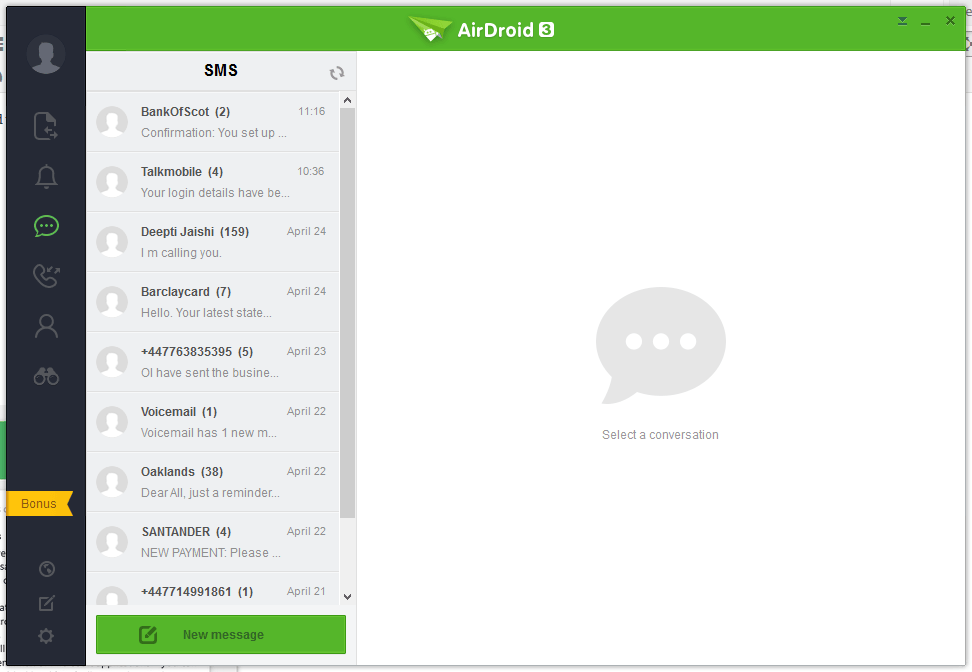


Pushbullet
The following are the screenshots for pushbullet on Windows Desktop.


Memorya
Windows
Airdroid used about 160MB memory whilst running in the background, whereas Pushbullet uses 28.7MB.
Android Phone
Airdroid on an android phone uses 9.9MB memory, whereas Pushbullet uses 7MB.
Conclusion
Both apps for sending notifications to a Windows desktop / laptop are very good. If the extra features of Airdroid are relevant to you, then this would be best. If you want to conserve memory and some of the extra features in Airdroid is not required, then Pushbullet is best.
