

ວິທີການຝັງຕົວອັກສອນໃນ PowerPoint Microsoft Office 2016
In order to edit a Powerpoint file on multiple computers, the font file should be embedded in the Powerpoint file, so that you don’t have to download each font file on every computer when editing.
ປະຕິບັດຕາມຄໍາແນະນໍາດັ່ງຕໍ່ໄປນີ້ຈະຝັງຕົວອັກສອນໃນ Powerpoint ໄດ້ 2016.
- ເລືອກເອົາໄຟລ໌
- ກົດບັນທຶກເປັນແລະເລືອກສະຖານທີ່ທີ່ທ່ານຢາກຈະຊ່ວຍປະຢັດການ
- ກົດເຄື່ອງມືທີ່ຫຼຸດລົງຫຼຸດລົງແລະຄັດເລືອກເອົາທາງເລືອກໃນການຊ່ວຍປະຢັດ
- ຈາກປ່ອງຢ້ຽມຕໍ່ໄປນີ້ເຮັດໃຫ້ແນ່ໃຈວ່າຈະຊ່ວຍປະຢັດໄດ້ຖືກຄັດເລືອກໃນເມນູດ້ານຊ້າຍ
- The select the checkbox from the last option embed fonts in the file
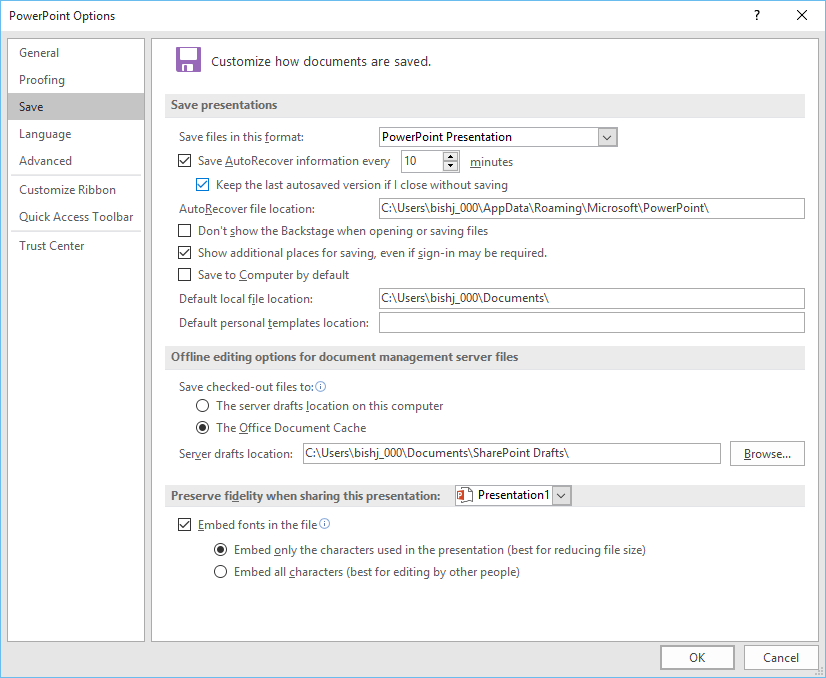
6. ກົດ OK ແລະຫຼັງຈາກນັ້ນຊ່ວຍປະຢັດ
