

Hogyan növelhető a videomemória 256 VirtualBoxban?
The maximum amount of video memory that can be allocated from the VirtualBox GUI is 128mb.

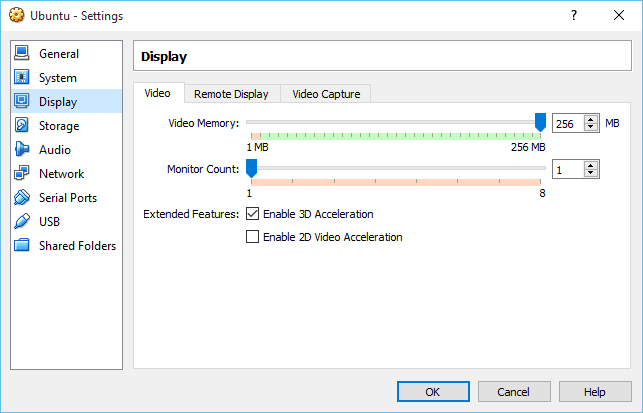
A videó memória is tovább nőtt, 256-re a parancssort.
Nyissa meg a parancssort, és keresse meg a VirtualBox telepítés helyét. Általában az alapértelmezett telepítési hely: C:\Program Files Oracle VirtualBox
Ezután írja be az alábbi parancsot a saját VM név:
VBoxManage modifyvm "Virtual machine name" --vram 256
Miután a parancs megadása sikeres látnod kell a következő a VM GUI.

Köszönöm ezerszer, hogy ez pontosan mit kerestem. Csinálják módon szenteli még jobb?
Helló újra
Vékony ez nem működik nekem. J'obtiens dans cmd VboxManage.exe hiba: coule nem szereti a regisztráltaknak gép neve "Mac’
VBoxManage.exe hiba: Részletek: kód VBOX_E_OBJECT_NOT_FOUND (0x80bb000)…
A megoldás kérjük?