

Windows istifadə Raspberry Pi Windows IOT Install 8.1 / 7 (/ Applydrive seçimi bu çərçivədə tanınmır.)
Siz Raspberry Pi Windows IOT yaradılması varsa, Yalnız bir Windows istifadə Microsoft talimatları istifadə yüklemek olacaq 10 OS.
Windows istifadə əgər 7, 8 və ya 8.1 sonra olacaq “/ Applydrive seçimi bu çərçivədə tanınmır.” səhv. This is because the dism.exe version on Windows 7, 8 və 8.1 Windows dism.exe fərqli 10.
Windows Windows IOT yüklemek üçün asan bir yol yoxdur 7, 8 və ya 8.1. Just follow the following instructions.
- Download the Raspberry Pi2 Windows IoT latest build from Microsoft Connect

- C Zip faylı çıxarış:/yaxta
- Download imgmount and place the exe file to c:/yaxta
- Open a administrator command prompt and go to c:/iot and type imgmount Flash.ffu. This will convert the ffu to a VHD image and mount it in Disk Management
- Go to disk management and detach the VHD
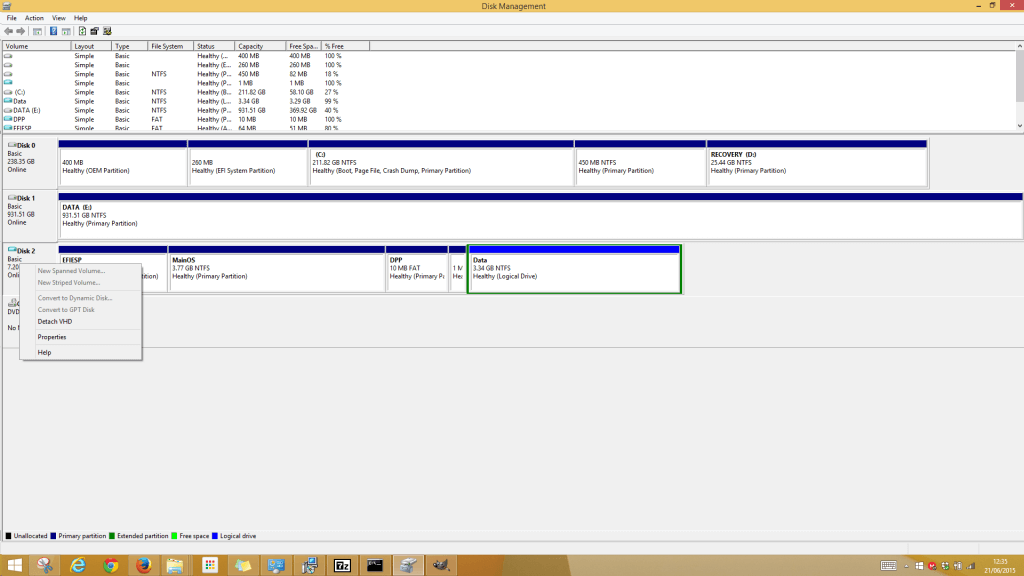
- Next is to restore the VHD file to the SD Card using winimage
- Download winimage and install. Open the winimage administrator
- Click Disk from the menu and choose Restore Virtual Hard Disk image on physical drive
- Select your SD Card from the list and navigate to the VHD file which should be the following path “C:\Users\{user}\AppData\Local\Temp” .
Restoring the image onto the SD Card can take a while. After it is complete insert the SD Card into the Raspberry Pi 2 and all should be working.
