

Windows ఉపయోగించి రాస్ప్బెర్రీ పై పై Windows IOT ఇన్స్టాల్ 8.1 / 7 (/ Applydrive ఎంపిక ఈ సందర్భంలో గుర్తించబడలేదు.)
మీరు రాస్ప్బెర్రీ పై పై Windows IOT ఏర్పాటు ఉంటే, మీరు మాత్రమే ఒక Windows ఉపయోగించి Microsoft సూచనలను ఉపయోగించి ఇన్స్టాల్ చేయగలరు 10 OS.
మీరు విండోస్ వాడుతున్నట్లయితే 7, 8 లేదా 8.1 అప్పుడు మీరు పొందుతారు “/ Applydrive ఎంపిక ఈ సందర్భంలో గుర్తించబడలేదు.” లోపం. This is because the dism.exe version on Windows 7, 8 మరియు 8.1 Windows లో DISM.exe భిన్నమైంది 10.
Windows లో Windows IOT ఇన్స్టాల్ సులభం మార్గం ఉంది 7, 8 లేదా 8.1. Just follow the following instructions.
- Download the Raspberry Pi2 Windows IoT latest build from Microsoft Connect

- సి జిప్ ఫైల్ సంగ్రహం:/యాచ్
- డౌన్లోడ్ imgmount and place the exe file to c:/యాచ్
- Open a administrator command prompt and go to c:/iot and type imgmount Flash.ffu. This will convert the ffu to a VHD image and mount it in Disk Management
- Go to disk management and detach the VHD
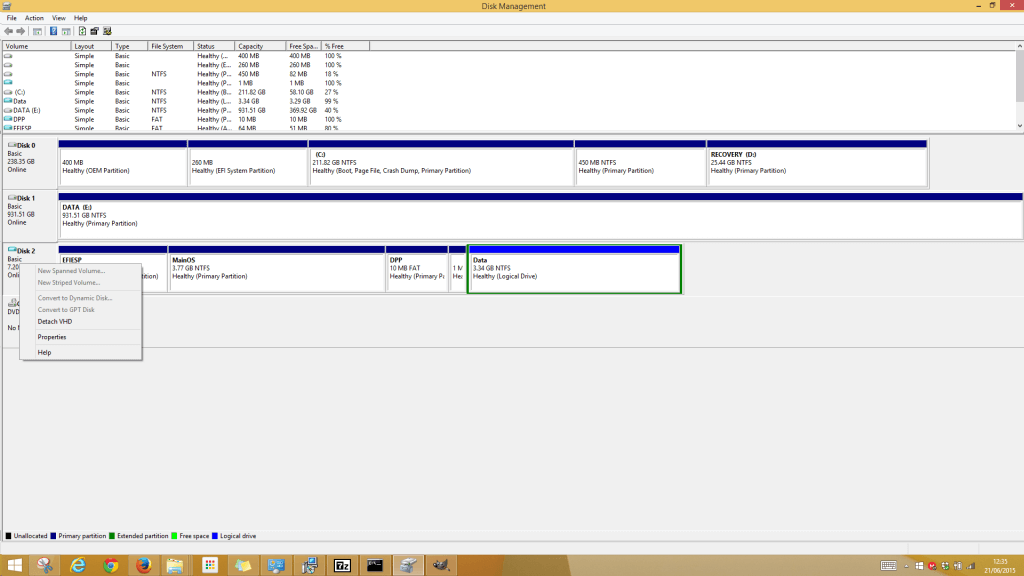
- Next is to restore the VHD file to the SD Card using winimage
- డౌన్లోడ్ winimage and install. Open the winimage administrator
- Click Disk from the menu and choose Restore Virtual Hard Disk image on physical drive
- Select your SD Card from the list and navigate to the VHD file which should be the following path “సి:\Users\{user}\AppData\Local\Temp” .
Restoring the image onto the SD Card can take a while. After it is complete insert the SD Card into the Raspberry Pi 2 and all should be working.
