

Faka Windows IoT on the Raspberry Pi usebenzisa Windows 8.1 / 7 (The / option applydrive alibonwa kulo mongo.)
Uma lokubeka Windows IoT on the Raspberry Pi, uyobe nje akwazi ukufaka ngokusebenzisa imiyalelo Microsoft usebenzisa Windows 10 OS.
Uma usebenzisa Windows 7, 8 noma 8.1 ke uyothola “The / option applydrive alibonwa kulo mongo.” Iphutha. Lokhu kungenxa yokuthi version dism.exe on Windows 7, 8 futhi 8.1 ihlukile the dism.exe on Windows 10.
Kukhona indlela elula ukufaka Windows IoT on Windows 7, 8 noma 8.1. Landela nje imiyalelo elandelayo.
- Download Raspberry Pi2 Windows IoT build yakamuva kusuka Microsoft Connect

- Okukhishwa ifayela zip c:/yacht
- Thwebula imgmount futhi beka ifayela exe ukuba c:/yacht
- Vula ogqamile umlawuli umyalo futhi uye c:/IoT uhlobo imgmount Flash.ffu. Lokhu kuzokwenza ukuguqula ffu emfanekisweni VHD nigibele it in Disk Management
- Iya disk ukuphathwa futhi ukhiphe VHD
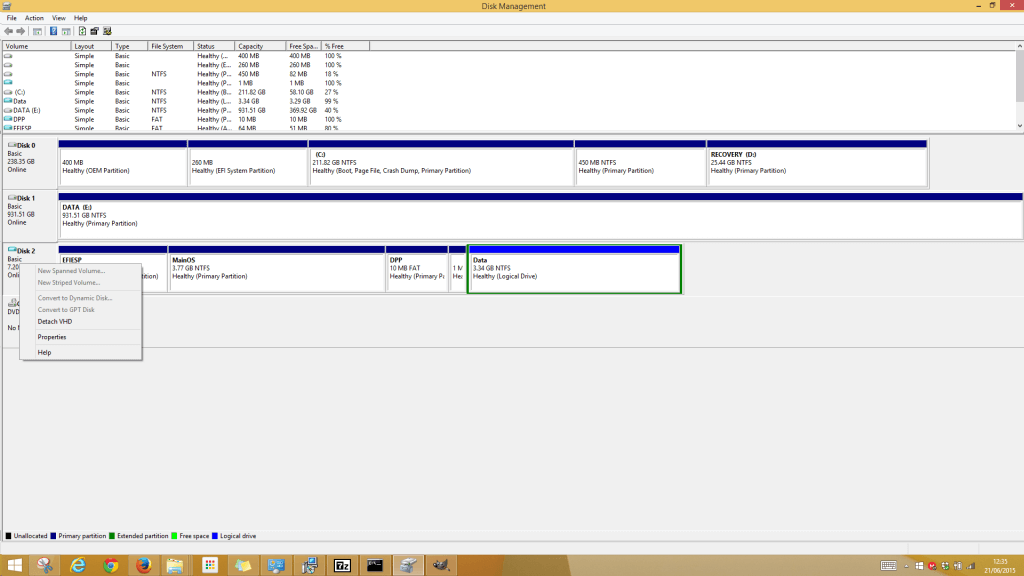
- Landelayo Iwukubuyisela ifayela VHD kuze winimage SD Card usebenzisa
- Thwebula winimage futhi ufake. Vula umlawuli winimage
- Chofoza Disk kusukela menu futhi ukhethe Buyisela Virtual Hard Disk isithombe drive ngokomzimba
- Khetha Card yakho SD ohlwini uzulazule ifayela VHD okufanele endleleni elandelayo “C:\Abasebenzisi {umsebenzisi}\AppData\Local\Temp” .
Ukubuyisela isithombe phezu Card SD kungathatha isikhashana. Ngemuva kuba Faka okuphelele SD Card singene Raspberry Pi 2 futhi bonke kufanele ukusebenza.
