

La LeTV LEECO 1 Avantaĝo Usono Versio X800 Malware Removal, TWRP Reakiro, Enraizamiento kaj Fiksante Boot Loop Problemoj
La LeTV la LEECO 1 Avantaĝo estas bonega telefono kiu venas je tre malalta prezo. Kelkaj podetalistoj vendas la telefonon por ĉ. £ 150. Tamen, telefono venas kun kelkaj problemoj.
La telefono venas inkludita kun malnova YouTube app kiu rifuzas ĝisdatigi al la lasta versio. The phone has malware where apps are installed in the background and ads are served in the Chrome browser.
At the time of writing there are no updated official ROMs. There are custom ROMs which should fix the problems above but there is no guarantee. sekve, estas pli facile ripari la problemojn supre ene ĉi instalitaj ROM.
#?Isdatigo 18.7.16
En la momento de skribado ne ekzistis oficiala ROM havebla. Nun oficiala ROM estis liberigita. Ĝi povas trovi en afiŝo. Instalante la oficiala ROM estas la plej facila vojo por ripari la malware kaj app problemojn kun la telefono.
The TrustGo App from the Google Play store pointed out that the Ant Keyboard bundled app contained the malware. The YouTube problem can be fixed by uninstalling the bundled YouTube and installing the latest YouTube from the Google Play Store.
La telefono devas esti enradikiĝita forigi la YouTube kaj la malware app Formiko Klavaro.
La jenaj instrukcioj elsxiros la LeTV Le 1 Pro USA version only. Tamen, elradikigu tedaĵo briko via telefono, so if you do go ahead it will be your responsiblity. Rooting also invalidates the warranty of the phone. You will also be able to unroot your phone at a later date and reinstate your warranty.
La jena supozas ke vi uzas Vindozo 10.
Elradikigu la LeTV Le 1 Avantaĝo Usono Versio
- instali TWRP
- TWRP will allow to root the phone. First it needs to be installed.
- Por instali TWRP, vi devas konekti la telefonon al la komputilo
- Permesas prepari la PC antaŭ ni konektantaj
- Instali Java JDK 8 uzante Chocolatey
- Malfermu administranto komando prompto
- Tipo cmd en la serĉo, dekstra klaku Komando Prompt elektas Kuru kiel administranto.
- Kopiu kaj algluu la sekvan kodon en la administra komando prompto fenestro instali chocolately
@powershell -NoProfile -ExecutionPolicy Bypass -Command "IEX ((nova-objekto net.webclient).DownloadString('https://chocolatey.org/install.ps1'))" && SET PATH =% PATH%;%ALLUSERSPROFILE% chocolatey bin
- Instali kaj agordi JDK 8 per intergluajn la sekvan kodon en la administra komando prompto fenestro.
choco install jdk8
- #De?uto, instali kaj agordi androide studo uzante la defaŭltojn en la aranĝo
- Elŝutu Android Studio
- Lanĉi instalinstrukciojn kaj akcepti la defaŭltojn
- En la fina ekrano elekti lanuch Android Studio kaj tiam fini
- Elekti la configure menuo kaj poste elekti SDK manaĝero

- En la SDK manaĝero, kontrolu Google USBa Ŝoforo de la SDK Iloj langeto kaj elektu OK

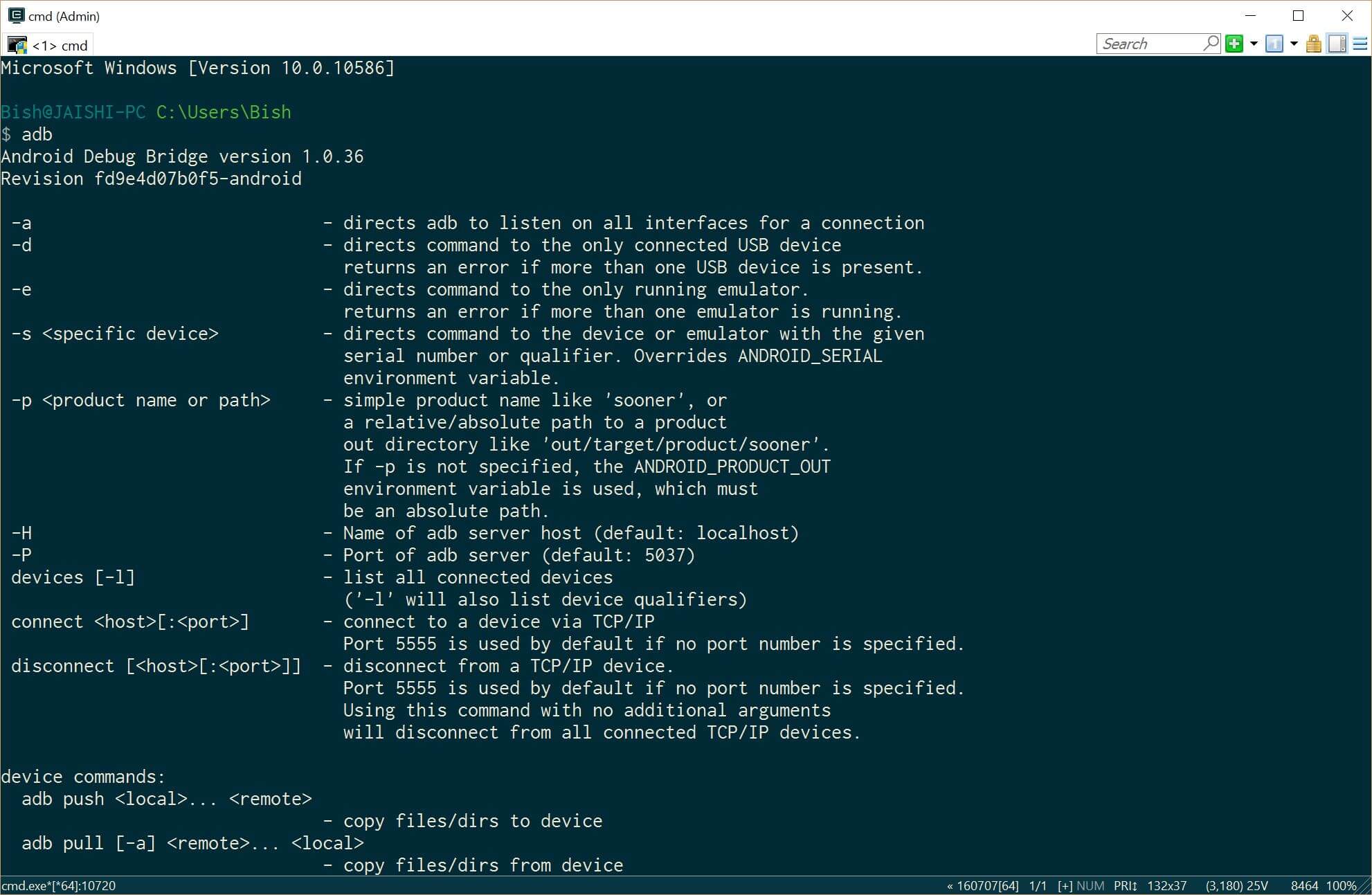
- Close the administrative command prompt and then open a new administrative command prompt and type adb. You should see the adb command returning help. This means that adb driver is installed and ready to go.
- Elŝutu la lastan version de TWRP sur la PC uzante tiun ligilo
- Alinomi la elŝutita dosiero recovery.img
- Malfermu administranto komando prompto
- Instali Java JDK 8 uzante Chocolatey
- Now it is time to prepare the phone before we connect it to our already prepared PC. If your phone does not boot into android then you can skip the whole of this #4 sekcio kaj pluiri al #5 (TWRP) section below.
- Go to settings and then about on your phone. Unlock developer options by touching the build number several times.
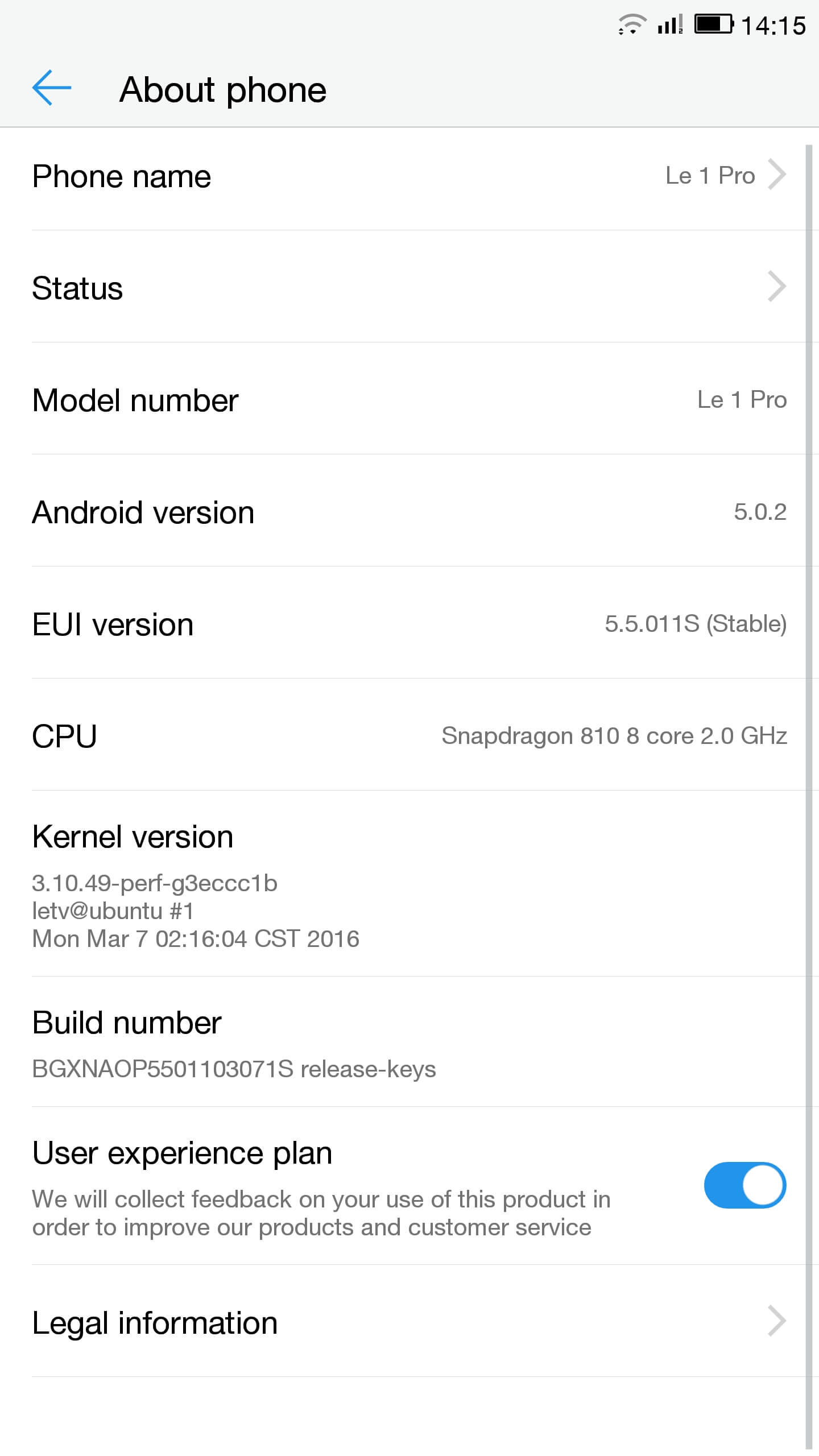
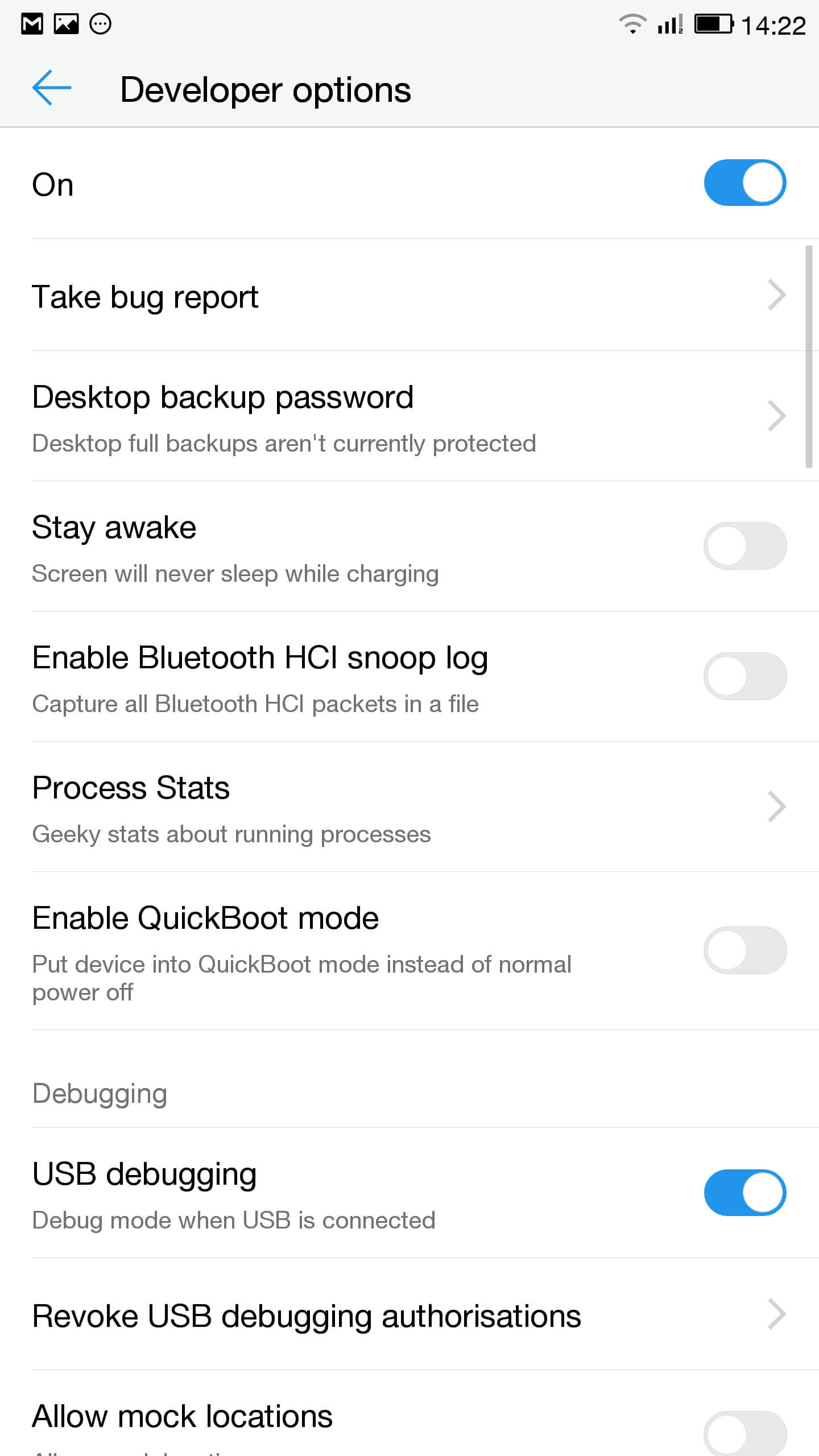
- Iri al fiksoj, desarrollador ebloj kaj ebligi USB elpuriganta
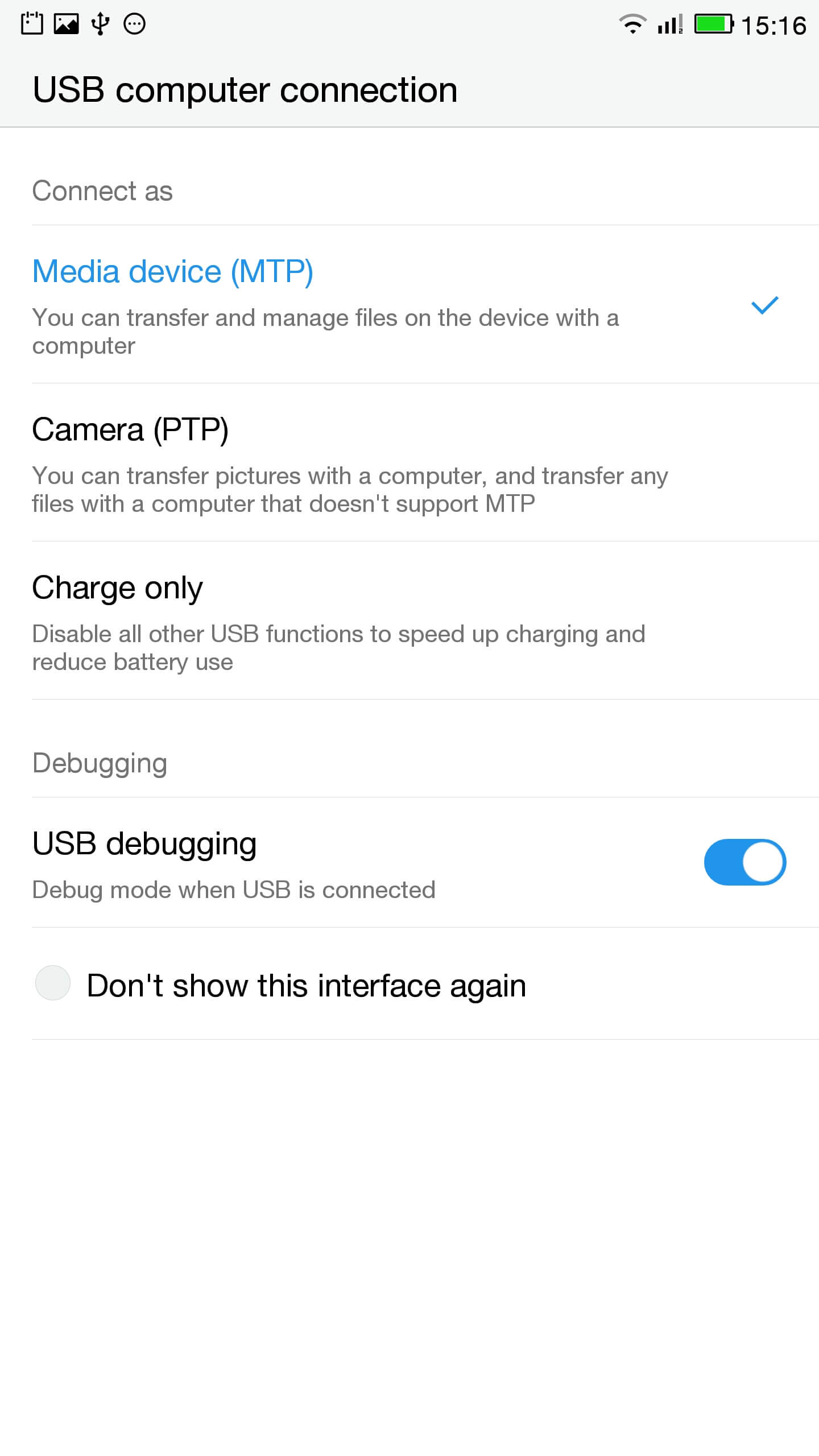
- En la sciigo trinkejo alklaku tuŝo por USB ebloj kaj certigi ke MTP estas selektita
- Konekti la telefonon al la komputilo
- En administra prompto kontroli la telefono estas konektita ĝuste tajpante
ADB aparatoj
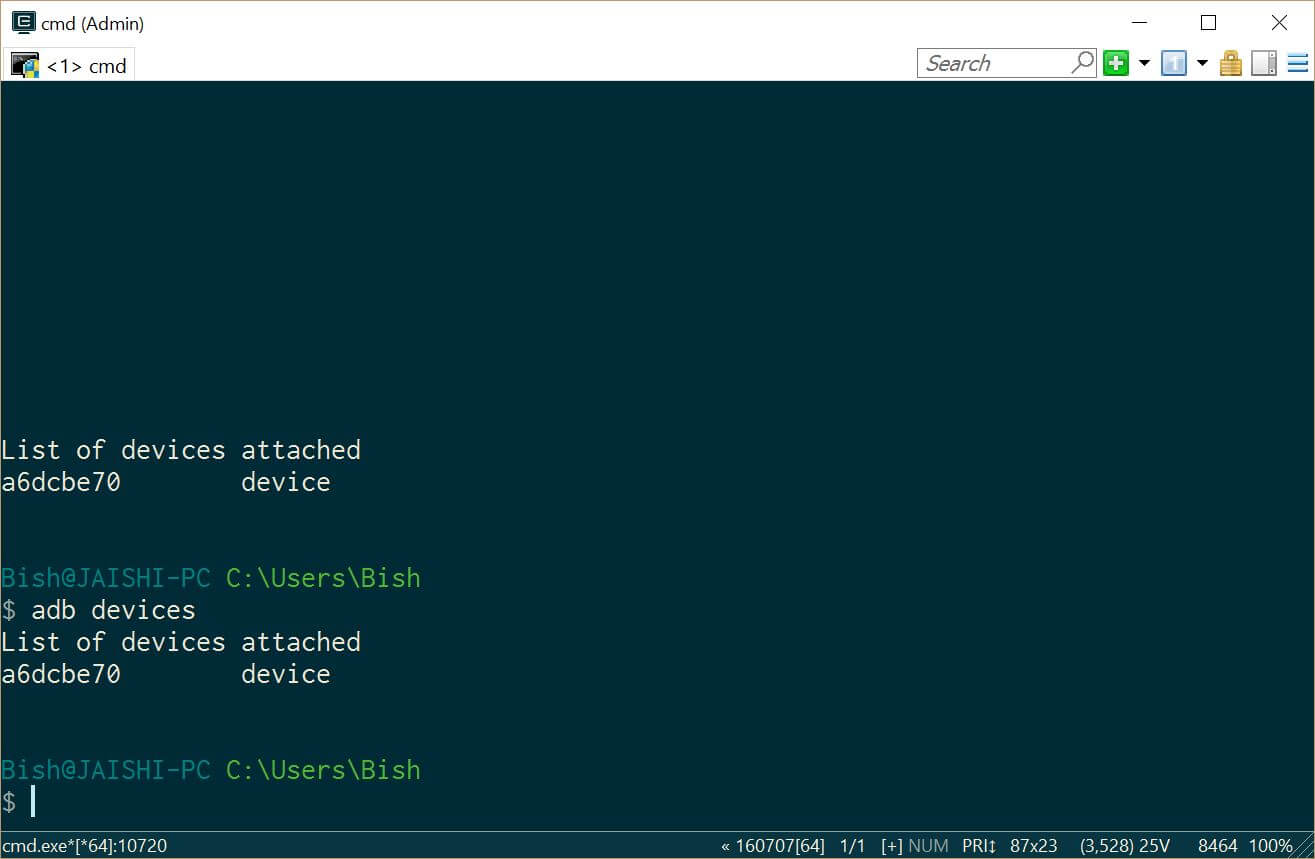
Vi devus vidi mekanismo sub adb aparatoj - #De?uto SuperSU kaj uzi la dosieradministrilo meti en la radika dosierujo de la telefono
- Go to settings and then about on your phone. Unlock developer options by touching the build number several times.
- Lets flash TWRP into the phone. You should not lose any data, sed se vi havas datumojn sur la telefono vi devas fari restaŭrkopion ĉiaokaze.
- Ni devas starti en fastboot. En la PC, malfermu administra komando prompto kaj tajpu
ADB reboot bootloader
Se via aparato ne boto en Android, vi povas iri en fastboot ŝanĝante vian telefonon, teni la malsupren volumo klavon kaj poste premi la potenca butono.
- Once in fastboot you should see a small picture of a penguin in the middle of the screen. To check that the phone is connected, en la administra komando prompto tipo
fastboot aparatoj
Vi devus vidi vian aparaton listigitaj
- En la administra komando prompto certigi vi estas en la dosierujo de la recovery.img dosieron kaj tajpu la sekvan
fastboot flash reakiro recovery.img
- Iam la reakiro ekbrilis tipo la sekvan kaj tenu la supren volumo ŝlosilo rekomenci en reakiro
fastboot reboot
- You should now be in TWRP. In TWRP there may be an option advanced or settings to install SuperSU. If the option is not there use install to install SuperSU (elŝutita pli frue) de la radiko de la telefono stokado.
- Fojo instalita povas restartigi en Android kaj sekvante la instrukcioj en la SuperSU app.
- Unufoje la instalaĵo estas kompleta malŝarĝo la RootChecker app de la Google Ludada vendejo kaj kontroli se la aparato estis fiksiĝinta.
- Ni devas starti en fastboot. En la PC, malfermu administra komando prompto kaj tajpu
- Fiksi la problemojn kun YouTube kaj forigante la malware
- Instali facila Uninstaller, Obstina Trojan Killer Kaj Malwarebytes Anti-Virus de la Google Play Store.
- Uninstall YouTube and Ant Keyboard. I uninstalled Cantonese Keyboard Language and Mii Browser as well as I was not using these. If you start getting errors, simple rekomenci vian aparaton.
- Elŝuti kaj instali la YouTube app de la Google Play Store.
- Kuri la obstina Trojan Killer kaj forigi ajnan trovita trojanoj.
- Run the Malwarebytes Anti-Virus and remove any found viruses. Run the privacy scanner and follow the recommendations.
Unufoje vi sukcese kompletigis la supre paŝoj tiam via aparato devus esti malware libera kaj tute uzebla.
troubleshooting
Mia aparato estas bricked
Your device may not be bricked. It may just look bricked as the screen may not turn on and it will not charge. If this is the case leave your device for at least a week without charging it at all so that all the power is drained out. After a week connect it to the charger and see if the LED light indicator shows. If the LED does come on then allow the phone to charge for about 90 minutes and then hold down volume and power button. The penguin icon should be on the screen. If you see the penguin then you can continue from E.ii from the instructions above.
Mia aparato estas en bootloop
Se tiu estas la kazo tiam nur teni la povon butonon por ĉirkaŭ 15 seconds until the device is off. Then hold down volume and power button. The penguin icon should be on the screen. If you see the penguin then you can continue from E.ii from the instructions above.
Android ne funkcias
Vi eble bezonas re-ekbrili la ROM. The original USA version of the ROM can be found tie.
Mi ne scias se mi havos la usona versio
Check the box of the device. If it has the web address of the USA website then it should be USA version, kvankam mi ne povas garantii ĝi.

Salut, j’ai suivi toutes les étapes à la lettre, cependant quand je tape en mode admin dans la console “fastboot device” aucun résultat…. c’est vide… que faire?
Switch off the phone. Hold the down volume key and then press power on button. You should see a penguin on the screen (this is fastboot mode). Now connect the phone to the PC. In an administrator command prompt type ‘fastboot devices’.
J’ai effectué cette manœuvre, vu le pinguin aussi au démarrage de l’appareil,
mais lorsque je passe en mode admin sur la console : je tape “adb device” mon appareil apparait dans la liste.
mais quand je tape “fastboot devices =”le néant complet ” il n’apparait pas, la est mon problème 🙁
The phone should remain in fastboot (penguin icon will show constantly on the screen) whilst you type the fastboot devices command. If the penguin picture goes off the screen then it means that your phone has rebooted and hence goes into android debugging.
If I try to turn it on it beeps and the notification light blinks red and purple. Any ideas?