

ວິທີການສ້າງຕັ້ງຂຶ້ນ Docker QuickStart Terminal ໃນ Cmder?
ຕໍ່ໄປນີ້ສະແດງໃຫ້ເຫັນວິທີການຕັ້ງ Docker Quickstart Terminal ໃນ Cmder.
- Enter the Setup tasks screen
Keyboard shortcut
Win + Alt + TVia menu
+ button -> Setup tasks….
- Expand Startup and Choose Tasks
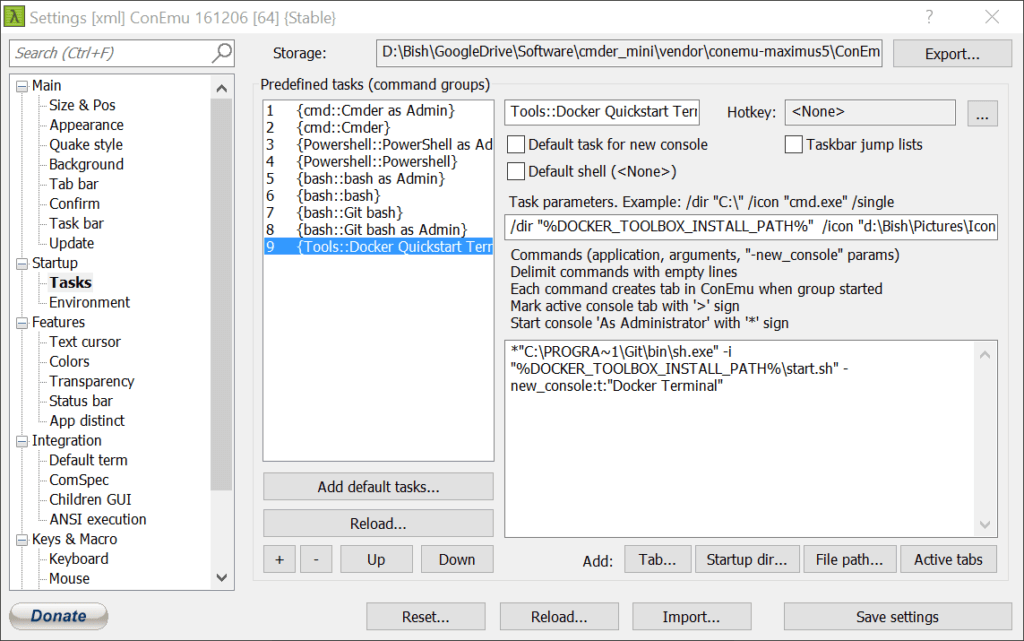
- Add a new Predefined task
Keyboard shortcut
Alt + ການປ່ຽນແປງທີ່ + +Via Menu
+ button - Name the task by replacing Group{number} with…
Tools::Docker Quickstart Terminal
The first part defines the task category and the second part is the task name
- Define the task parameters.
/ໃຫ້ເຈົ້າ "%DOCKER_TOOLBOX_INSTALL_PATH%" /ໄອຄອນ "d:\User\Pictures\Icons\if_github_334641.ico"
Here a custom icon is used, ensure that your path and .ico file is specified.
ຊ່ວຍເຫຼືອ
/ໃຫ້ເຈົ້າ – sets the working directory, where new processes will be started
/ໄອຄອນ – icon that is displayed in the tabs - Add the commands
*"C:\PROGRA~1\Git\bin\sh.exe" -ຂ້າພະເຈົ້າ "%DOCKER_TOOLBOX_INSTALL_PATH%\start.sh" -new_console:t:"Docker Terminal"
Docker Client on Windows should be run as elevated as we have set up here. Ensure that the path to the Git binary files matches your set-up.
ຊ່ວຍເຫຼືອ
* – run as elevated
-ຂ້າພະເຈົ້າ – program arguments
-new_console:t – tab name
-new_console:d – ລະບົບ
Your final set-up should look like the following

