

Jak opravit & obnoví chybějící zabezpečení, Sdílení a přizpůsobit úchyty ve vlastnostech složky ve Windows 10
To reinstate all or any of the tabs requires editing the registry. All the edits can be done in the same location in the registry.
To open the registry:
Win Key + R
regedit -> OK
The registry should be open. Make sure the address bar is showing…
View -> Address Bar
Paste the following registry location into the address bar…
ComputerHKEY_CLASSES_ROOTDirectoryshellexPropertySheetHandlers
Here we need to create registry key values for each of the missing tabs.
Security Tab
Right click on the PropertySheetHandlers key…
New -> Key
Název nového klíče následujícího…
{1f2e5c40-9550-11ce-99d2-00aa006e086c}
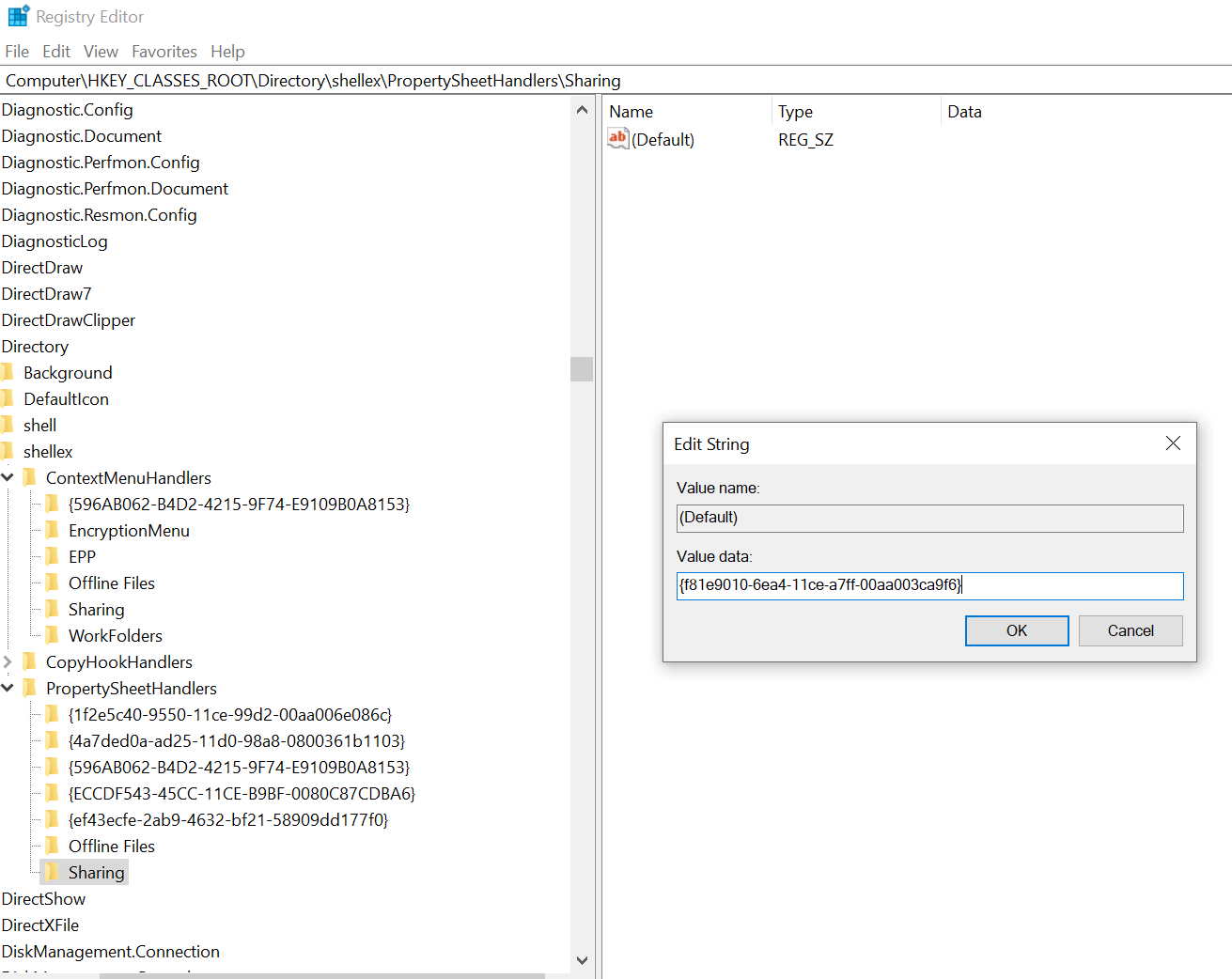
Sharing Tab
Right click on the PropertySheetHandlers key…
New -> Key
Název nového klíče následujícího…
Sharing
Make sure the new key Sharing is selected by clicking on it. In the right pane double click the Default entry and enter the following in the value data field:
{f81e9010-6ea4-11ce-a7ff-00aa003ca9f6}
Customise Tab
Right click on the PropertySheetHandlers key…
New -> Key
Název nového klíče následujícího…
{ef43ecfe-2ab9-4632-bf21-58909dd177f0}
