

Com configurar Cmder per executar el Windows PowerShell en Cmder Posada en marxa amb el seu perfil d'usuari com el directori de treball actual a Windows 10
Els següents passos li permetrà PowerShell en Cmder llançament, with the path set to your %userprofile%. If you have used a context menu, això no va a interferir amb la funcionalitat de l'menú de context.
- Ensure PowerShell is the default task in Cmder.
menu -> settings -> startup
Ensure the specified task is Powershell and then Save settings.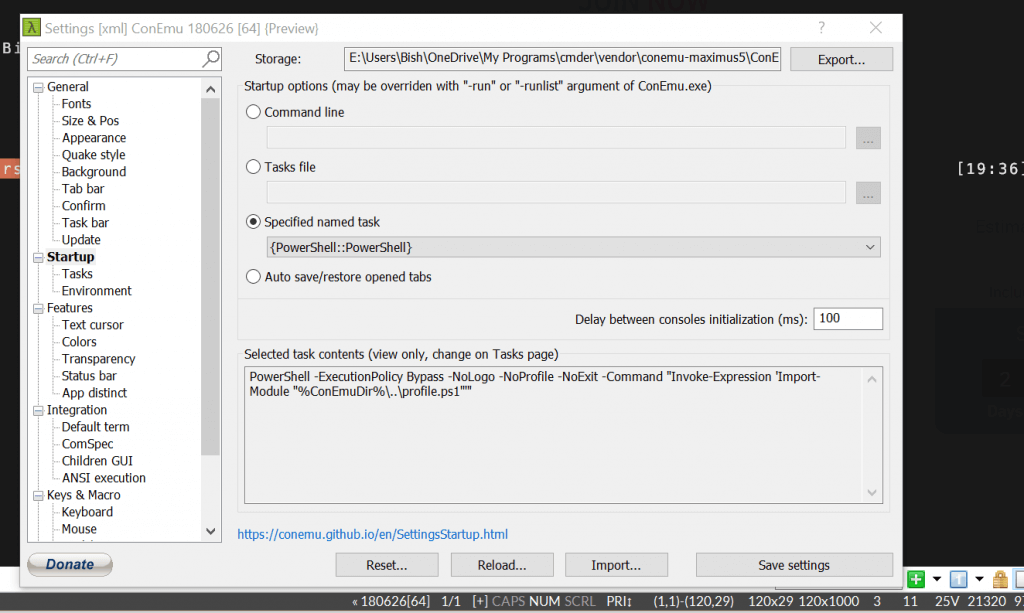
- Navigate to your Cmder installation location and right click cmder.exe and click copy.

- Go to your desktop, then right click, and then choose paste shortcut.
- Right click on the newly created shortcut and choose Properties.
- Add the following to the end of the Target property after the double quote
Cmder.exe" /start "%userprofile%"
Feu clic a D'acord
Double click the Cmder shortcut and PowerShell will launch with your user profile as the present working directory.
You can also pin the short cut to the Start menu by right clicking it, and choosing Pin to Start.
