
បង្ហាញការជូនដំណឹងប្រព័ន្ធប្រតិបត្តិការ Android ស្មាតហ្វូននៅលើ Windows 7/8.1 ផ្ទៃតុ / កុំព្យូទ័រយួរដៃ / កុំព្យូទ័រកុំព្យូទ័របន្ទះ
ការភ្ជាប់ប្រព័ន្ធប្រតិបត្តិការ Android ស្មាតហ្វូនរបស់អ្នកទៅកុំព្យូទ័រផ្ទៃតុឬកុំព្យូទ័រយួរដៃរបស់ Windows របស់អ្នក, គុណសម្បត្តិជាច្រើនដូចជាផ្តល់ឱ្យអាចសាកទូរស័ព្ទរបស់អ្នកឬមិនអើពើការជូនដំណឹងថាមិនមានសារៈសំខាន់ខណៈដែលអ្នកកំពុងប្រើកុំព្យូទ័រផ្ទៃតុឬកុំព្យូទ័រយួរដៃរបស់ Windows របស់អ្នក.
មាន 2 កម្មវិធីប្រព័ន្ធប្រតិបត្តិការ Android ដ៏សំខាន់ដែលមានបានយ៉ាងងាយស្រួលដ៏ល្អបំផុតនៅក្នុងអនុញ្ញាតឱ្យអ្នកដើម្បីធ្វើការនេះ. They are:
- Pushbullet
- AirDroid
កម្មវិធីទាំងពីរនេះតម្រូវឱ្យអ្នកទាញយកកម្មវិធីប្រព័ន្ធប្រតិបត្តិការ Windows, ដែលកម្មវិធីនេះបន្ទាប់មកប្រើដើម្បីផ្ញើការជូនដំណឹងទៅកាន់កុំព្យូទ័រយួរដៃ / ផ្ទៃតុ.
ចូរមានរូបរាងកាន់តែខិតជិតទាំងនៅផ្នែកខាងកម្មវិធីដោយភាគី.
នេះជាកម្មវិធីចំណុចប្រទាក់ប្រព័ន្ធប្រតិបត្តិការ Android
AirDroid

Pushbullet

លក្ខណៈពិសេស
AirDroid
ផ្ទេរឯកសារ
ផ្ទេរឯកសារពីទូរស័ព្ទរបស់អ្នកទៅផ្ទៃតុរបស់អ្នក. ឯកសារអាចជាអត្ថបទ, រូបថត, កាមេរ៉ា, តន្ត្រីឬវីដេអូ. Airdroid allows to transfer multiple files at any one time.
កម្មវិធីគ្រប់គ្រងឯកសារ
Airdroid មានកម្មវិធីគ្រប់គ្រងឯកសារធម្មតា.
ចំណុចក្តៅ
ចែករំលែកការតភ្ជាប់ទូរស័ព្ទចល័តរបស់អ្នក
ក្រវ៉ាត់
អនុញ្ញាតក្រវ៉ាត់របស់ USB
Booster
Booster frees RAM by closing apps.
កម្មវិធី
This is an app manager that allows to uninstall apps
Find phone
Visit a web browser and enter the airdroid url to find your phone.
ចំណុចក្តៅ
Share your mobile data connection with other devices.
ក្រវ៉ាត់
អនុញ្ញាតក្រវ៉ាត់របស់ USB
Pushbullet
ផ្ទេរឯកសារ
ផ្ទេរឯកសារពីទូរស័ព្ទរបស់អ្នកទៅផ្ទៃតុរបស់អ្នក. ឯកសារអាចជាចំណាំ, តំណភ្ជាប់, រូបថតនិងឯកសារ. Files can only be transferred one at a time.
ឆានែល
Pushbullet allows following channel feeds, which allows to receive latest news from followed channels.
ឧទាហរណ៏នៃអ្វីដែលត្រូវធ្វើតាមគឺ TopGear, ប្រព័ន្ធប្រតិបត្តិការ Android និងមានច្រើនទៀត…
Add Friends
If you know anybody registered with pushbullet then you will be able to add them as a friend. Adding friends enables you to push files, photos, notes and links to your friends.
កុំព្យូទ័រយួរដៃរបស់វីនដូ / ចំណុចប្រទាក់ផ្ទៃតុ
AirDroid


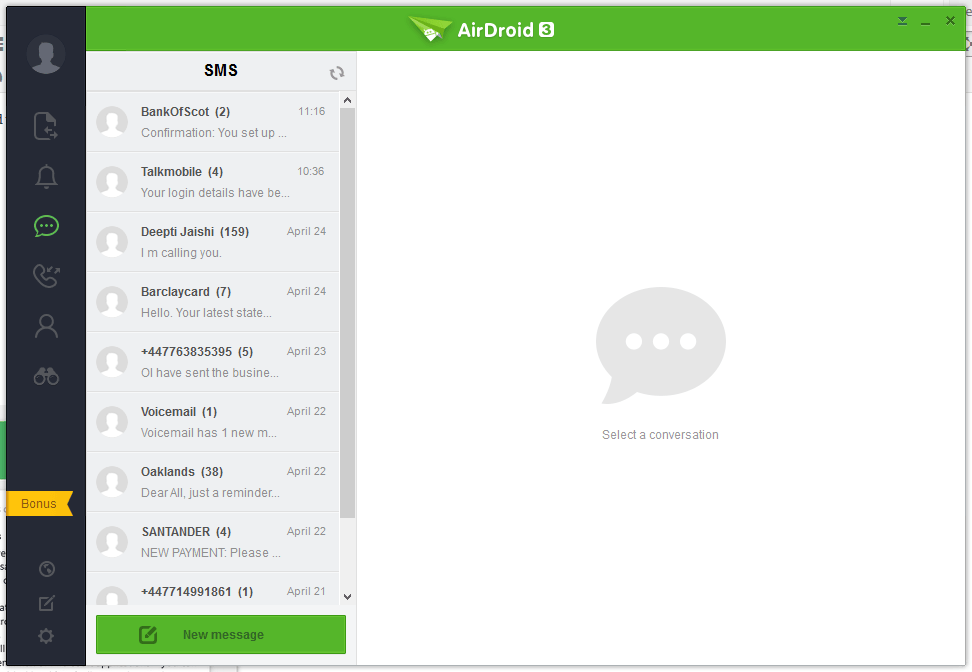


Pushbullet
The following are the screenshots for pushbullet on Windows Desktop.


សតិ
ប្រព័ន្ធប្រតិបត្តិការ Windows
Airdroid used about 160MB memory whilst running in the background, whereas Pushbullet uses 28.7MB.
Android Phone
Airdroid on an android phone uses 9.9MB memory, whereas Pushbullet uses 7MB.
សេចក្តីសន្និដ្ឋាន
Both apps for sending notifications to a Windows desktop / laptop are very good. If the extra features of Airdroid are relevant to you, then this would be best. If you want to conserve memory and some of the extra features in Airdroid is not required, then Pushbullet is best.
