

Giunsa paghimo ang usa ka pagpili gamit ang marquee tool gamit ang fixed size & ratio sa Affinity Photo?
sa Photoshop, ikaw makahimo sa pagpili sa matang sa pagpili alang sa Marquee Tool. matang pagpili sa Photoshop ang mga, normal, Lig-on Ratio ug Natudlong Size.
Sa inigsoonay Photo (v1.6.4) there is no selection type for the Marquee Tool. Apan, you are still able to select using Fixed Size.
Lig-on sized Pagpili sa inigsoonay Photo
-
Pilia ang 'rektanggulo nga tolda Himan’ from tools, or press M .
-
Pagpili sa bisan unsa nga dapit sa ibabaw sa mga King
-
Change the size of the selection from the Transform panel. Size adjustment is marked W: for width and H: for height.
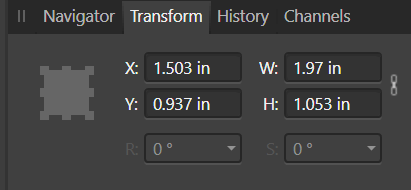
-
Drag the newly sized selection to where you want it.
Fixed Ratio Selection in Affinity Photo
The Fixed Ratio Selection in Affinity Photo is missing in the Marquee Tools. Subo, Fixed Ratio Selection is only available in the Crop Tool, which can only be used for cropping
-
Choose the ‘Crop Tool’ from tools, or press C .
-
Choose ‘Custom Ratio’ from the Mode: drop down menu
Change the values for the custom ratio
-
Click and drag the crop selection on to the canvas
