

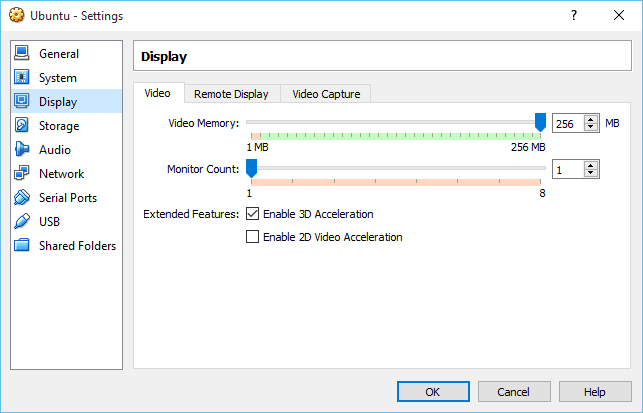
Carane nambah memori video kanggo 256MB ing VirtualBox?
The maximum amount of video memory that can be allocated from the VirtualBox GUI is 128mb.

Memori video bisa tambah luwih 256MB saka baris command prompt.
Bukak command prompt lan navigasi menyang lokasi instalasi VirtualBox Panjenengan. Usually the default installation location is C:\Program Files\Oracle\VirtualBox
Banjur ngetik printah ing ngisor iki karo jeneng VM dhewe:
VBoxManage modifyvm "Virtual machine name" --vram 256
Sawise printah wis ngetik kasil sampeyan kudu ndeleng iki ing VM GUI.

Merci mille fois c’est exactement ce que je cherchais. Y a t’il moyen d’en dédier encore mieux?
Rebonjour
Mince ça a pas marché pour moi. J’obtiens dans cmd VboxManage.exe error: coule not fond a registrated machine named ‘Mac’
VBoxManage.exe error: Détails: code VBOX_E_OBJECT_NOT_FOUND (0x80bb000)…
Une solution svp?