
Windows मा Android स्मार्टफोन सूचनाहरू प्रदर्शन 7/8.1 डेस्कटप / ल्याप्टप / ट्याब्लेट पीसी
आफ्नो Windows डेस्कटप वा ल्यापटप पीसी आफ्नो Android स्मार्टफोन जडान, यस्तो आफ्नो फोन चार्ज या तपाईं whilst महत्त्वपूर्ण छैनन् कि सूचनाहरू बेवास्ता गर्न सक्ने व्यक्तिको रूपमा दिन्छ धेरै फाइदा आफ्नो Windows डेस्कटप वा ल्यापटप पीसी उपयोग गर्दै.
छन् 2 तपाईं यस गर्न अनुमति सजिलै सबै भन्दा राम्रो हो कि मुख्य Android अनुप्रयोग. They are:
- Pushbullet
- AirDroid
दुवै अनुप्रयोगहरू तपाईं Windows सफ्टवेयर डाउनलोड गर्न आवश्यकता, जो अनुप्रयोगहरू त्यसपछि ल्याप्टप सूचना पठाउन प्रयोग / डेस्कटप.
पक्षमा द्वारा दुवै अनुप्रयोगहरू पक्ष करीब नजर छ.
Android अनुप्रयोग इन्टरफेस
AirDroid

Pushbullet

विशेषताहरु
AirDroid
फाइल स्थानान्तरण
आफ्नो डेस्कटप आफ्नो फोन देखि फाइलहरु लाई हस्तांतरण. फाइल पाठ हुन सक्छ, फोटो, क्यामेरा, संगीत वा भिडियो. Airdroid allows to transfer multiple files at any one time.
फाइल प्रबन्धक
Airdroid एक सरल फाइल प्रबन्धक छ.
हटस्पट
आफ्नो मोबाइल साझेदारी गर्नुहोस्
Tethering
USB टेथर सक्षम
Booster
Booster frees RAM by closing apps.
अनुप्रयोग
This is an app manager that allows to uninstall apps
Find phone
Visit a web browser and enter the airdroid url to find your phone.
हटस्पट
Share your mobile data connection with other devices.
Tethering
USB टेथर सक्षम
Pushbullet
फाइल स्थानान्तरण
आफ्नो डेस्कटप आफ्नो फोन देखि फाइलहरु लाई हस्तांतरण. फाइल नोट हुन सक्छ, लिंक, फोटो र फाइल. Files can only be transferred one at a time.
च्यानल
Pushbullet allows following channel feeds, which allows to receive latest news from followed channels.
पालन गर्न कुराहरू उदाहरण TopGear हो, एन्ड्रोइड र अधिक…
Add Friends
If you know anybody registered with pushbullet then you will be able to add them as a friend. Adding friends enables you to push files, photos, notes and links to your friends.
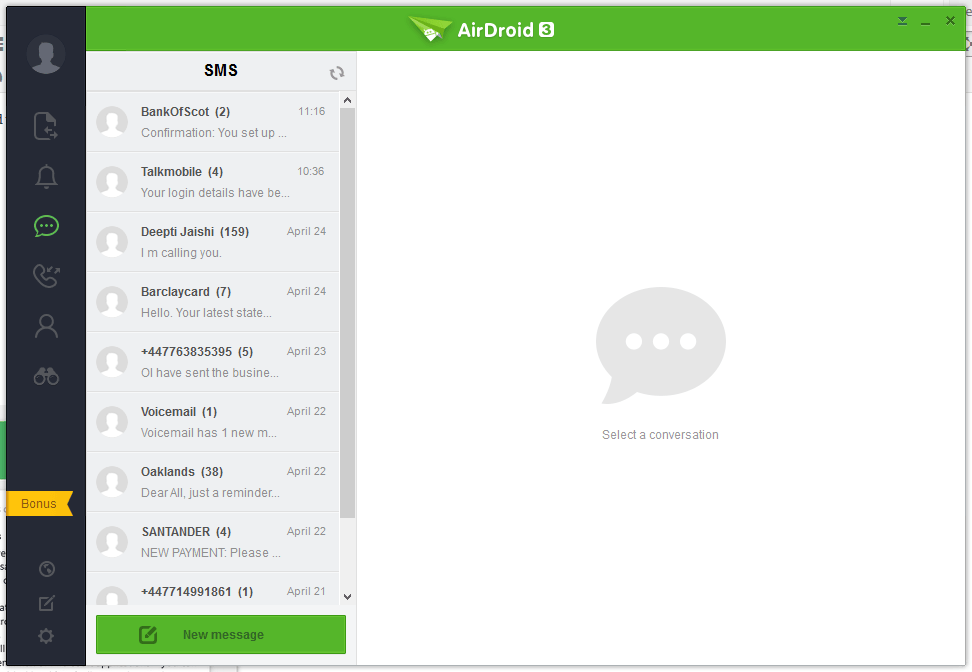
Windows ल्याप्टप / डेस्कटप इन्टरफेस
AirDroid




Pushbullet
The following are the screenshots for pushbullet on Windows Desktop.


स्मरण गर्नुपर्ने
Windows
Airdroid used about 160MB memory whilst running in the background, whereas Pushbullet uses 28.7MB.
Android Phone
Airdroid on an android phone uses 9.9MB memory, whereas Pushbullet uses 7MB.
निष्कर्ष
Both apps for sending notifications to a Windows desktop / laptop are very good. If the extra features of Airdroid are relevant to you, then this would be best. If you want to conserve memory and some of the extra features in Airdroid is not required, then Pushbullet is best.
