

How to set up Docker Quickstart Terminal in Cmder?
The following shows how to set up the Docker Quickstart Terminal in Cmder.
- Enter the Setup tasks screen
Keyboard shortcut
Win + Alt + TVia menu
+ button -> Setup tasks….
- Expand Startup and Choose Tasks
- Add a new Predefined task
Keyboard shortcut
Alt + Shift + +Via Menu
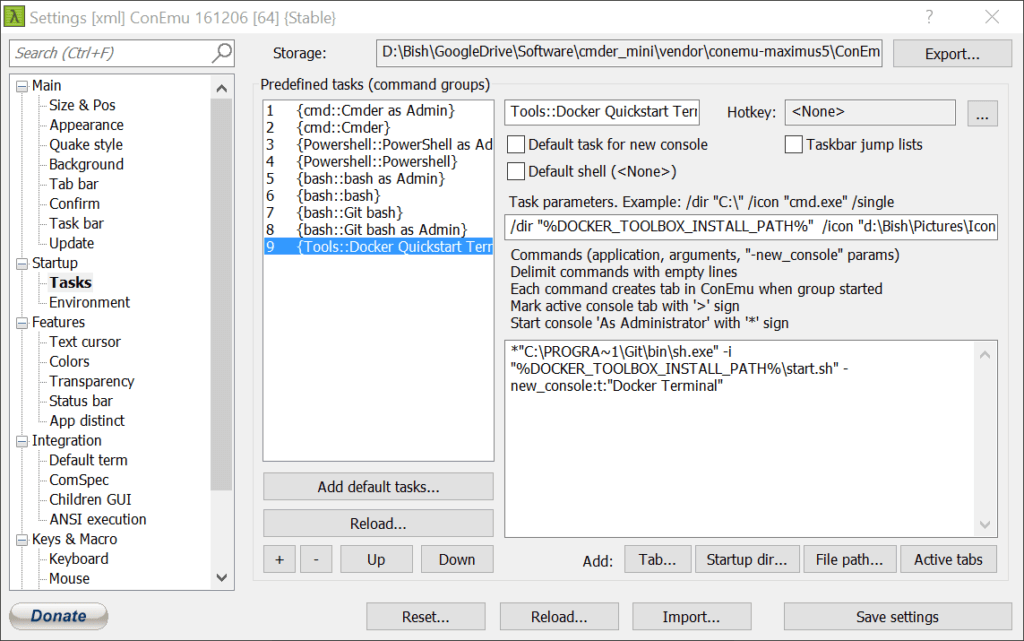
+ button - Name the task by replacing Group{number} with…
Tools::Docker द्रुतसुरु टर्मिनलपहिलो भाग कार्य श्रेणी परिभाषित र दोस्रो भाग कार्य नाम हो
- कार्य मापदण्डहरू परिभाषित.
/तपाईं "%DOCKER_TOOLBOX_INSTALL_PATH%" /प्रतिमा "घ:\User\Pictures\Icons\if_github_334641.ico"यहाँ एक अनुकूलन प्रतिमा प्रयोग गरिन्छ, आफ्नो पथ र .ico फाइल निर्दिष्ट गरिएको छ भन्ने सुनिश्चित गर्न.
सहयोग
/तपाईं – को काम निर्देशिका सेट, जहाँ नयाँ प्रक्रिया सुरु हुनेछ
/प्रतिमा – ट्याबहरू प्रदर्शित छ प्रतिमा - आदेशहरूमा थप्न
*"सी:\PROGRA~1\Git\bin\sh.exe" -म "%DOCKER_TOOLBOX_INSTALL_PATH%\start.sh" -new_console:टी:"Docker टर्मिनल"
Docker Client on Windows should be run as elevated as we have set up here. Ensure that the path to the Git binary files matches your set-up.
सहयोग
* – run as elevated
-म – program arguments
-new_console:टी – tab name
-new_console:घ – निर्देशिका
Your final set-up should look like the following

